Saturday, June 30, 2012
Gigabyte launches dual-purpose Aivia Xenon mouse
Friday, December 30, 2011
Gigabyte issues BIOS update for fire-prone motherboards
Tuesday, November 29, 2011
Gigabyte unveils 3-in-1 convertible Booktop T1132N
Monday, October 3, 2011
Gigabyte G1.Sniper2 Motherboard Review
NVIDIA GeForce GTX 560 Ti Roundup: ASUS, EVGA, Gigabyte & MSI
The GTX 560 Ti follows very much in the GTX 460’s overclocking footsteps since it has the ability to increase both core and memory clock speeds to some incredible levels. This has allowed several companies like EVGA, Gigabyte, ASUS and MSI to release some higher end products which feature increased clock speeds, custom cooling and some excellent software which can be used to push things even further.
For this roundup, we have chosen four of the more popular GTX 560 Ti cards currently on the market: the ASUS DirectCu II TOP, MSI Twin Frozr II OC, Gigabyte Super Overclock and the EVGA Superclocked. Their clock speeds and feature lists run the gamut so by seeing what they offer, we should be able to get a good indication what the GTX 560 market will look like in the coming months.
In previous generations, it wasn’t unusual to see $30 or more tacked onto a GPU’s price simply because it carried a minimal speed increase. Times have changed as the market has become more competitive and every one of the cards featured in this roundup carries no more than a $20 premium over reference-based products while clock speeds get significant bumps. Indeed, the MSI Twin Frozr II OC model features a $249 price; the same cost as a standard GTX 560.
We have already see that the GTX 560 Ti has what it takes to compete with the previous generation’s flagship products and even gives current GPUs a run for their money. It should be interesting to see how this translates into a lineup of pre-overclocked and custom cooled AiB cards.
Sunday, May 15, 2011
Gigabyte on Verge of Introducing first mSATA Capable Motherboard
Gigabyte introduced it new line of Z68 motherboards capable of ssd caching with Intels Smart Response technology but their upcoming release in June will be of particular interest.
It seems that Gigabyte is pushing to be the first to release a motherboard with mSATA capabilities to take advantage of Intels Larson Creek slc SSDs.
We have to wonder whether this integrated mSATA interface is capable of allowing us to hook up an mSATA drive up as a boot drive as well. Now that would be particularly interesting! Heres the release!
Taipei, Taiwan, May 11th 2011 – GIGABYTE INC., a leading manufacturer of motherboards and graphics cards, today launched their highly anticipated Z68 series motherboards, based on the Intel® Z68 Express Chipset and supporting the new 2nd generation Intel® Core™ processors.
Delivering the very best that Intel® 6 series chipsets have to offer, including a significant performance boost with Intel® Smart Response Technology, the first ever mSATA drive connectors on a standard desktop PC motherboard,and GIGABYTE’s proprietary Touch BIOS™ technology, GIGABYTE Z68 series motherboards put users in the driver seat, allowing them to take total control over how their system operates and performs to best match their individual computing needs.
11 models are available now, with more than 9 additional models, including at least 4 mSATA versions, to be introduced in June, 2011.
“GIGABYTE is excited to introduce a complete range of Z68 Express Chipset enabled motherboards that deliver exceptional performance and a multitude of unique features like Touch BIOS and onboard mSATA that help them stand out from the crowd,” commented Richard Chen, VP of Worldwide Sales and Marketing at GIGABYTE. ” Intel has really raised the bar with the performance potential and rich feature set of the Z68 chipset, and as such, we fully expect the Z68 chipset to be the number one choice for users wanting to build their next Intel 6 series-based system.”
“We are very pleased to see the exciting new lineup of GIGABYTE motherboards based on the Intel®Z68 Express Chipset,” said Zane Ball, Intel General Manager of Desktop Platforms. “These high quality boards will enable users to unleash the full performance and features of our 2nd generation Intel® Core™ Processors.”
| Integrated Graphics Options with onboard mSATA – coming soon | |||
| Z68XP-UD3 | Z68XP-D3 | Z68AP-D3 | Z68P-DS3 |
Friday, April 22, 2011
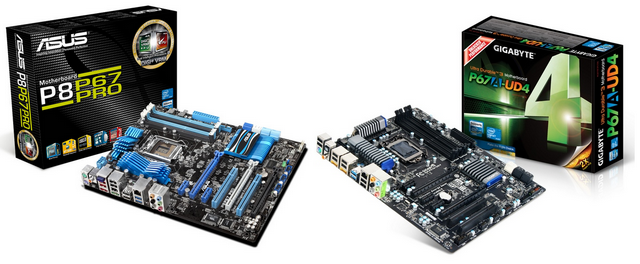
The Battle of the P67 Boards - ASUS vs. Gigabyte
In the world of motherboards and manufacturer competition, the idea is to beat your competitor. To develop the product, with more features, more fancy gadgets, and perform better than your competitor at every price point. Today, we pit arguably the two most popular motherboard vendors at a price point that will see a significant number of sales from consumers and enthusiasts alike – the ASUS P8P67 Pro and theGigabyte P67A-UD4, which were both released during the Sandy Bridge week for $190. Forget all the marketing fluff; this is a showdown!
When a new platform is released, a myriad of motherboards hit the shelves at the same time. Each vendor will usually come out with a few products, targeting their prospective markets. Big motherboard players, like ASUS and Gigabyte, will release motherboards ranging from the cheap low end, to that high-end halo product. They will bombard you with data, ideas, concepts, and reasons why their high-end products are better than their low end – in terms of numbers, features, or what is in the box. Whether you can really trust what each manufacturer says on the box depends on the interpretations of the benchmarks and analyses by review sites like AnandTech.
At the time of writing, Newegg has 56 Sandy Bridge motherboards available – 22 for H67 and 34 for P67. Of those in the P67 range, you can pick up an Intel motherboard for as little as $115, or an ASUS as expensive as $320. So what makes that expensive motherboard worth almost three times as much as the low-end board? What makes a $200 board better than a $150 board? Features? Warranty? Overclockability? Price? All of these points, while valid, carry different weight with every different consumer.
I reviewed the ASRock P67 Extreme4 at the Sandy Bridge release, and they offered a great product that is available online for $153. Today, we have two boards released at $190 by two of the biggest motherboard manufacturers – the ASUS P8P67 Pro, and the Gigabyte P67A-UD4. Firstly, the question is: if you had $190, which one would you buy? Then secondly, we have to ask: are these boards worth the ~$40 difference to the P67 Extreme4? Luckily, at least in my opinion, after using all three of the boards, the answers to both of these questions were self-evident.
Firstly, let us tackle the ASUS P8P67 Pro.
Thursday, March 17, 2011
Gigabyte releases Sandy Bridge SATA checker utility
Tuesday, January 11, 2011
Gigabyte GA-P67A-UD4 Motherboard Review

The new Intel P67 chipset lies at the heart of the Gigabyte GA-P67A-UD4, and Gigabyte has utilized it to great advantage with full support for Intel's SandyBridge Processors. While the GA-P67A-UD4 sits in the middle of Gigabyte's P67 lineup, there is no shortage of innovation and design. As part of the Ultra Durable 3 series, the GA-P67A-UD4 uses 50,000 hour solid capacitors and a 2oz copper circuit board used in conjunction with 12 phase power design for cooler board temperatures and longer life. Gigabyte's 333 design incorporates USB 3.0, 6Gbs SATA 3 and 3X typical USB power, now adding Turbo XHD to its SATA 3.0 options. Turbo XHD offers automatic setup for RAID 0, offering 4X the speed of a conventional SATA 2.0 HDD. The 3X USB power incorporated in the GA-P67A-UD4 offers 1500mA to USB 2.0 ports and 2700mA to USB 3.0 ports. This means faster charging for peripherals (such as cell phones and mp3 players) and many times relieves the need for external power or USB Y-connectors for higher powered USB devices. Power to the USB ports is always present on the GA-P67A-UD4 regardless of the computers boot state making USB charging always readily available.
Overview
With the release of the new 32nm Intel Sandy Bridge processors, including the Core i3, i5 and i7, many users are interested in finding out more about the new P67 Express Chipset motherboards, which can push the latest K series processors to unbeliveable frequencies. The GIGABYTE GA-P67A-UD7 motherboard we just reviewed was designed for Extreme Gamers, Film and Video Editors and Overclocking Enthusiasts, providing the users with features that only a smaller percentage of users actually need, though the ones that do are sure to appreciate them. In this review, we'll take a look at the GIGABYTE GA-P67A-UD4 motherboard, which is more suitable for enthusiast users who don't want to push their hardware to stratospheric levels.
While the UD7 will be the most reliable and stable motherboard of GIGABYTE's P67 lineup, the GA-P67A-UD4 will fit perfectly for those looking at upgrading their older Core 2 Duo, Core 2 Quad or even recent Nehalem-based i3, i5, and i7 processors. It will also be a good board for users transitioning from AMD based motherboards. The P67A-UD4 motherboard offers plenty of features that enthusiasts and gamers are looking for, like USB 3.0, SATA III, SLI and CrossFire X support, as well as excellent high-quality PCB and component design with overclocking features that will make applications fly using the latest Core i5 and i7 LGA1155 socket Sandy Bridge processors. The Sandy Bridge K-series processors combined with high end P67 motherboards like the GIGABYTE P67A-UD4 provide excellent overclocking features while maintaining a low power consumption and low temeprature output.
GIGABYTE still continues to include the same features that brought their products such acclaim, like the Ultra Durable 3 design, ON/OFF Charge and 333 Onboard Acceleration. With the new P67 Chipset Motherboards, GIGABYTE has also upgraded their VRM design by using Driver MOSFET packages over regular MOSFETs. These Driver MOSFETs deliver higher power transfer rate and increase efficiency at higher switching frequencies. The Driver MOSFET's also provide lower power loss, lower temperatures, and a smaller footprint over regular MOSFETs
Current Intel chipsets support PCI-Express 2.0 at a lower 2.5GT/s, which limits each direction of a lane to a maximum of 250MB/s. With USB 3.0 and 6Gbps SATA interfaces connected to PCI-Express x1 slots, devices connected to these interfaces will be limited to the 250MB/s speeds. A nice change on the P67 lineup of motherboards allow the PCI-Express slots to operate at a stunning 5GT/s, providing up to 500MB/s of bandwidth in each direction. This adds up to 1GB/s bidirectional bandwidth.
Another very nice improvement on the P67 Express Chipset with the proper BIOS allows users to take advantage of 3TB hard drives in their systems, as opposed to the 2TB-2.2TB limitation from X58 based motherboards. The GIGABYTE P67A-UD4 motherboard updated to the latest BIOS supports 3TB hard drives.
Also, some manufacturers like ASUS are slowly making the move to the UEFI (Unified Extensible Firmware Interface) BIOS instead of the traditional 32-bit BIOS on their P67 motherboards. The UEFI provides a GUI (Graphical User Interface) for the BIOS, making it possible to not only use the keyboard, but also the mouse to adjust system settings. This is also easier on the eyes, especially for users not used to the DOS like systems. Unfortunately, at the moment GIGABYTE does not offer support for UEFI.
The P67A-UD4 has full overclocking potential when paired with the appropriate unlocked K-Series processor, including an unlocked memory multiplier. The H67 architecture motherboards unfortunately have a locked memory multiplier, but can take advantage of Intel's integrated graphics that are built into all Sandy Bridge CPUs, whereas the P67 boards cannot. This is why there are several video outputs on the H67 lineup of motherboards and none on the P67. Right now it seems that there will not be a hybrid solution for the Intel Sandy Bridge built-in GPU to work together with dedicated video cards, but this is not definite and could change in the future.
The GIGABYTE P67A-UD4 will be running for an affordable MSRP of $199.99, not the $239.99 MSRP that we first expected. While it is not the cheapest motherboard on the market, it sounds like a fair price for its features and quality.
Thank you for AcousticPC.com for providing us with a quiet, jet powerful water cooling setup to test out the overclocking portion of the board.